- 1. ภาพรวมสถาปัตยกรรม
- 2. gRPC ต่างจาก REST อย่างไร
- 3. RPC 4 รูปแบบที่ gRPC รองรับ
- Workshop: สร้าง Product gRPC API ด้วย Go
- การทดสอบ gRPC API ด้วย grpcurl
- ทำความเข้าใจ gRPC Status Code
- Deadline และ Timeout
- Metadata
- Authentication
- Unary Interceptor
- gRPC Reflection
- gRPC และ Browser
- API Versioning
- กฎสำคัญของ Protobuf Schema Evolution
- การออกแบบ Project สำหรับระบบจริง
- Production Checklist
- gRPC Health Checking
- gRPC ใน Microservices
- gRPC เหมาะกับงานประเภทใด
- สรุปขั้นตอนสร้าง gRPC API
- References
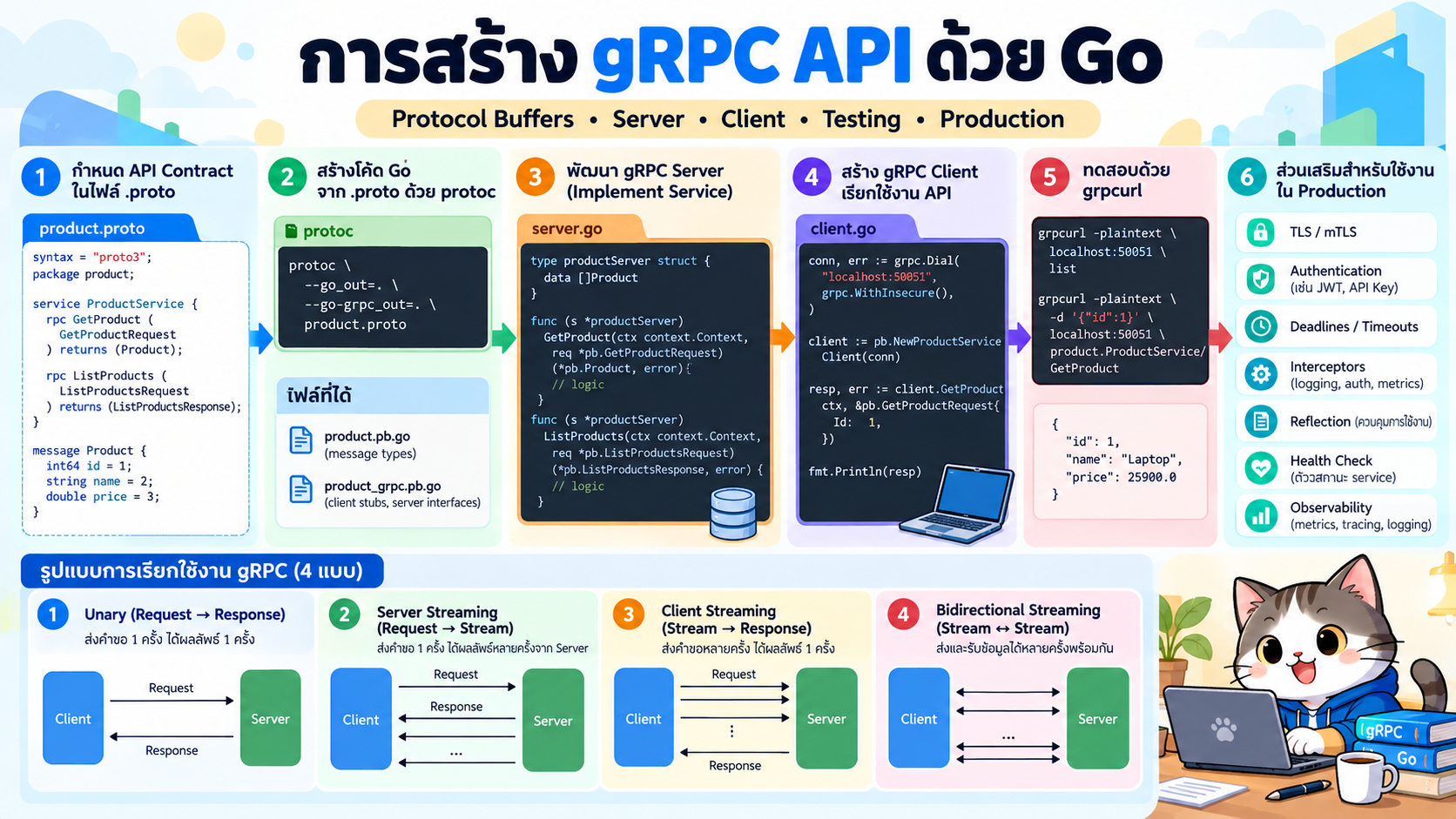
gRPC เป็นแนวทางพัฒนา API แบบ Remote Procedure Call (RPC) ที่ออกแบบมาให้บริการต่าง ๆ เรียกใช้งานกันได้เสมือนเรียกฟังก์ชันภายในโปรแกรม โดยทั่วไป gRPC ใช้ Protocol Buffers (Protobuf) เป็นทั้ง Interface Definition Language (IDL) และรูปแบบข้อมูลสำหรับสื่อสารระหว่าง Client กับ Server
จุดเด่นสำคัญคือ เรากำหนดสัญญาของ API เพียงครั้งเดียวในไฟล์ .proto แล้วใช้ protoc สร้างโค้ดฝั่ง Client และ Server ได้หลายภาษา เช่น Go, Java, Python, C#, Node.js และภาษาอื่น ๆ
บทความนี้จะสร้างตัวอย่าง Product Service ด้วย Go ตั้งแต่ศูนย์ โดยมี API สำหรับสร้างสินค้าและค้นหาสินค้าตามรหัส
#1. ภาพรวมสถาปัตยกรรม
flowchart LR
    C[Client Application]
    S[gRPC Server]
    P[Product Service]
    DB[(Database)]

    C -->|gRPC call| S
    S --> P
    P --> DB
    DB --> P
    P -->|Protobuf response| S
    S -->|HTTP/2| C
แนวคิดหลักคือ
- กำหนด Service และ Message ในไฟล์
.proto - ใช้
protocสร้าง Source Code - ฝั่ง Server implement interface ที่ generate มา
- ฝั่ง Client สร้าง Stub แล้วเรียก RPC method
- gRPC จัดการ serialization และการสื่อสารให้
#2. gRPC ต่างจาก REST อย่างไร
| ประเด็น | REST API | gRPC |
|---|---|---|
| รูปแบบข้อมูลที่พบบ่อย | JSON | Protocol Buffers |
| Contract | OpenAPI เป็นทางเลือก | .proto เป็นศูนย์กลาง |
| การ generate client | ทำได้ | เป็น workflow หลัก |
| รูปแบบการเรียก | HTTP resource/verb | เรียก RPC method |
| Streaming | ต้องออกแบบเพิ่มเติม | รองรับโดยตรง |
| Human-readable | สูง | ต่ำ เพราะ Protobuf เป็น binary |
| Browser | ใช้งานตรงได้ง่าย | มักใช้ gRPC-Web |
| เหมาะกับ | Public/Web API | Internal API, Microservices, low-latency systems |
gRPC ไม่ได้หมายความว่าจะต้องแทน REST ทุกกรณี ระบบหนึ่งสามารถใช้ REST สำหรับ Public API และใช้ gRPC สำหรับการสื่อสารระหว่าง Microservices ได้
#3. RPC 4 รูปแบบที่ gRPC รองรับ
#3.1 Unary RPC
Client ส่ง Request หนึ่งครั้ง และ Server ตอบ Response หนึ่งครั้ง
Client ---- Request ----> Server
Client <--- Response ---- Server
ตัวอย่าง:
rpc GetProduct(GetProductRequest) returns (Product);
เหมาะกับ CRUD และคำสั่งทั่วไป
#3.2 Server Streaming
Client ส่ง Request หนึ่งครั้ง แต่ Server ส่งข้อมูลกลับหลายรายการ
rpc ListProducts(ListProductsRequest) returns (stream Product);
#3.3 Client Streaming
Client ส่งข้อมูลหลายรายการ แล้ว Server ตอบกลับหนึ่งครั้ง
rpc UploadProducts(stream Product) returns (UploadResult);
#3.4 Bidirectional Streaming
ทั้ง Client และ Server สามารถส่ง Stream หากันได้
rpc Chat(stream ChatMessage) returns (stream ChatMessage);
เหมาะกับระบบ real-time, telemetry และ collaborative applications
#Workshop: สร้าง Product gRPC API ด้วย Go
#4. สิ่งที่ต้องติดตั้ง
ต้องมี
- Go
- Protocol Buffer Compiler (
protoc) protoc-gen-goprotoc-gen-go-grpc
ตรวจสอบ Go:
go version
ตรวจสอบ Protobuf compiler:
protoc --version
#macOS
brew install protobuf
#Ubuntu/Debian
sudo apt update
sudo apt install -y protobuf-compiler
ติดตั้ง Go plugins:
go install google.golang.org/protobuf/cmd/protoc-gen-go@latest
go install google.golang.org/grpc/cmd/protoc-gen-go-grpc@latest
เพิ่ม Go binary directory ลงใน PATH หากยังไม่มี:
export PATH="$PATH:$(go env GOPATH)/bin"
#5. สร้าง Project
mkdir grpc-demo
cd grpc-demo

go mod init example.com/grpc-demo
สร้าง directory:
mkdir -p proto/product/v1
mkdir -p cmd/server
mkdir -p cmd/client
โครงสร้างเริ่มต้น:
grpc-demo/
├── cmd/
│   ├── client/
│   │   └── main.go
│   └── server/
│       └── main.go
├── proto/
│   └── product/
│       └── v1/
│           └── product.proto
└── go.mod
#6. สร้างไฟล์ Protocol Buffers
สร้างไฟล์
proto/product/v1/product.proto
เนื้อหา:
syntax = "proto3";

package product.v1;

option go_package = "example.com/grpc-demo/gen/product/v1;productv1";

service ProductService {
  rpc GetProduct(GetProductRequest) returns (Product);
  rpc CreateProduct(CreateProductRequest) returns (Product);
}

message Product {
  string id = 1;
  string name = 2;
  double price = 3;
}

message GetProductRequest {
  string id = 1;
}

message CreateProductRequest {
  string name = 1;
  double price = 2;
}
#อธิบายส่วนสำคัญ
syntax = "proto3";
กำหนด syntax ของ Protocol Buffers
package product.v1;
ใช้ namespace และวางพื้นฐานสำหรับ API versioning
option go_package = "...";
ระบุ Go package ที่ต้องการ generate
ส่วน
service ProductService
คือ service contract ของ API
และ
message Product
คือ schema ของข้อมูล
#7. Generate Go Code จาก .proto
รัน:
protoc \
  -I proto \
  --go_out=. \
  --go_opt=module=example.com/grpc-demo \
  --go-grpc_out=. \
  --go-grpc_opt=module=example.com/grpc-demo \
  proto/product/v1/product.proto
จะได้ไฟล์ประมาณนี้:
gen/
└── product/
    └── v1/
        ├── product.pb.go
        └── product_grpc.pb.go
ไฟล์สำคัญคือ
product.pb.go— Message และ Protobuf serializationproduct_grpc.pb.go— Client stub และ Server interface
ไม่ควรแก้ generated files ด้วยมือ เพราะสามารถ generate ใหม่ได้ทุกครั้งจาก .proto
#8. เพิ่ม Dependency
รัน:
go get google.golang.org/grpc
go get google.golang.org/protobuf
go mod tidy
#9. สร้าง gRPC Server
สร้างไฟล์
cmd/server/main.go
package main

import (
	"context"
	"fmt"
	"log"
	"net"
	"sync"

	pb "example.com/grpc-demo/gen/product/v1"

	"google.golang.org/grpc"
	"google.golang.org/grpc/codes"
	"google.golang.org/grpc/reflection"
	"google.golang.org/grpc/status"
)

type productServer struct {
	pb.UnimplementedProductServiceServer

	mu       sync.RWMutex
	products map[string]*pb.Product
}

func newProductServer() *productServer {
	return &productServer{
		products: map[string]*pb.Product{
			"p001": {
				Id:    "p001",
				Name:  "Mechanical Keyboard",
				Price: 2490,
			},
		},
	}
}

func (s *productServer) GetProduct(
	ctx context.Context,
	req *pb.GetProductRequest,
) (*pb.Product, error) {

	if req.GetId() == "" {
		return nil, status.Error(
			codes.InvalidArgument,
			"product id is required",
		)
	}

	s.mu.RLock()
	product, ok := s.products[req.GetId()]
	s.mu.RUnlock()

	if !ok {
		return nil, status.Error(
			codes.NotFound,
			"product not found",
		)
	}

	return product, nil
}

func (s *productServer) CreateProduct(
	ctx context.Context,
	req *pb.CreateProductRequest,
) (*pb.Product, error) {

	if req.GetName() == "" {
		return nil, status.Error(
			codes.InvalidArgument,
			"product name is required",
		)
	}

	if req.GetPrice() < 0 {
		return nil, status.Error(
			codes.InvalidArgument,
			"price must be greater than or equal to zero",
		)
	}

	s.mu.Lock()
	defer s.mu.Unlock()

	id := fmt.Sprintf("p%03d", len(s.products)+1)

	product := &pb.Product{
		Id:    id,
		Name:  req.GetName(),
		Price: req.GetPrice(),
	}

	s.products[id] = product

	return product, nil
}

func main() {
	listener, err := net.Listen("tcp", ":50051")
	if err != nil {
		log.Fatalf("listen failed: %v", err)
	}

	grpcServer := grpc.NewServer()

	pb.RegisterProductServiceServer(
		grpcServer,
		newProductServer(),
	)

	// ทำให้ grpcurl/Postman สามารถ discover service ได้
	reflection.Register(grpcServer)

	log.Println("gRPC server running on :50051")

	if err := grpcServer.Serve(listener); err != nil {
		log.Fatalf("server failed: %v", err)
	}
}
#10. รัน Server
go run ./cmd/server
ผลลัพธ์:
gRPC server running on :50051
Port มาตรฐานไม่ได้บังคับว่าต้องเป็น 50051 แต่เป็น port ที่นิยมใช้ในตัวอย่าง gRPC
#11. สร้าง gRPC Client
สร้างไฟล์
cmd/client/main.go
package main

import (
	"context"
	"log"
	"time"

	pb "example.com/grpc-demo/gen/product/v1"

	"google.golang.org/grpc"
	"google.golang.org/grpc/credentials/insecure"
)

func main() {
	conn, err := grpc.NewClient(
		"localhost:50051",
		grpc.WithTransportCredentials(
			insecure.NewCredentials(),
		),
	)
	if err != nil {
		log.Fatalf("create client failed: %v", err)
	}
	defer conn.Close()

	client := pb.NewProductServiceClient(conn)

	ctx, cancel := context.WithTimeout(
		context.Background(),
		3*time.Second,
	)
	defer cancel()

	created, err := client.CreateProduct(
		ctx,
		&pb.CreateProductRequest{
			Name:  "Wireless Mouse",
			Price: 1290,
		},
	)
	if err != nil {
		log.Fatalf("CreateProduct failed: %v", err)
	}

	log.Printf(
		"created: id=%s name=%s price=%.2f",
		created.GetId(),
		created.GetName(),
		created.GetPrice(),
	)

	product, err := client.GetProduct(
		ctx,
		&pb.GetProductRequest{
			Id: created.GetId(),
		},
	)
	if err != nil {
		log.Fatalf("GetProduct failed: %v", err)
	}

	log.Printf(
		"product: id=%s name=%s price=%.2f",
		product.GetId(),
		product.GetName(),
		product.GetPrice(),
	)
}
insecure.NewCredentials()เหมาะสำหรับ local development เท่านั้น ระบบ production ควรใช้ TLS หรือ mTLS
#12. รัน Client
เปิด Terminal ใหม่ โดย Server ต้องยังทำงานอยู่:
go run ./cmd/client
ตัวอย่างผลลัพธ์:
created: id=p002 name=Wireless Mouse price=1290.00
product: id=p002 name=Wireless Mouse price=1290.00
Flow การทำงานคือ
Go Client
   |
   | CreateProduct()
   v
gRPC Server
   |
   | ProductService
   v
Create Product
   |
   v
Protobuf Response
#การทดสอบ gRPC API ด้วย grpcurl
#13. ติดตั้ง grpcurl
ถ้ามี Go:
go install github.com/fullstorydev/grpcurl/cmd/grpcurl@latest
#14. ดู Service ทั้งหมด
Server ตัวอย่างเปิด gRPC Reflection ไว้แล้ว จึงสามารถใช้คำสั่ง:
grpcurl -plaintext localhost:50051 list
ควรพบ:
grpc.reflection.v1.ServerReflection
grpc.reflection.v1alpha.ServerReflection
product.v1.ProductService
#15. ดู Method ของ Service
grpcurl \
  -plaintext \
  localhost:50051 \
  list product.v1.ProductService
จะพบประมาณ:
product.v1.ProductService.CreateProduct
product.v1.ProductService.GetProduct
#16. เรียก CreateProduct
grpcurl \
  -plaintext \
  -d '{"name":"USB-C Hub","price":1590}' \
  localhost:50051 \
  product.v1.ProductService/CreateProduct
ตัวอย่าง Response:
{
  "id": "p002",
  "name": "USB-C Hub",
  "price": 1590
}
#17. เรียก GetProduct
grpcurl \
  -plaintext \
  -d '{"id":"p001"}' \
  localhost:50051 \
  product.v1.ProductService/GetProduct
ตัวอย่าง Response:
{
  "id": "p001",
  "name": "Mechanical Keyboard",
  "price": 2490
}
#ทำความเข้าใจ gRPC Status Code
gRPC ไม่ใช้ HTTP Status Code เป็น API contract หลักเหมือน REST แต่มี status codes ของ gRPC เช่น
| Code | ความหมาย |
|---|---|
OK |
สำเร็จ |
INVALID_ARGUMENT |
Request ไม่ถูกต้อง |
NOT_FOUND |
ไม่พบ resource |
ALREADY_EXISTS |
มีข้อมูลอยู่แล้ว |
UNAUTHENTICATED |
ยังไม่ได้ authenticate |
PERMISSION_DENIED |
ไม่มีสิทธิ์ |
DEADLINE_EXCEEDED |
ใช้เวลานานเกิน deadline |
UNAVAILABLE |
Service ใช้งานไม่ได้ชั่วคราว |
INTERNAL |
Internal server error |
ตัวอย่าง:
return nil, status.Error(
	codes.NotFound,
	"product not found",
)
#Deadline และ Timeout
Distributed systems ไม่ควรปล่อยให้ Client รอแบบไม่มีขอบเขต
ในตัวอย่างเราใช้:
ctx, cancel := context.WithTimeout(
	context.Background(),
	3*time.Second,
)
defer cancel()
ถ้า Server ตอบไม่ทัน Client จะได้รับ error ที่เกี่ยวข้องกับ deadline
การกำหนด deadline ช่วยป้องกัน request ค้างและ resource exhaustion ในระบบ Microservices
#Metadata
gRPC Metadata มีบทบาทคล้าย HTTP headers
ตัวอย่างสิ่งที่นิยมใส่ใน metadata:
- Authorization token
- Correlation ID
- Trace ID
- Tenant ID
- Client version
ตัวอย่างฝั่ง Client:
import "google.golang.org/grpc/metadata"

md := metadata.Pairs(
	"authorization",
	"Bearer TOKEN",
)

ctx := metadata.NewOutgoingContext(
	context.Background(),
	md,
)
#Authentication
แนวทางที่พบบ่อย:
Client
  |
  | Authorization metadata
  v
gRPC Interceptor
  |
  | Validate JWT / API Key
  v
Service Method
สำหรับ production สามารถใช้
- TLS
- mTLS
- JWT
- OAuth 2.0
- API Key
- Service identity
โดยทั่วไป Transport Security และ Application Authentication เป็นคนละชั้น ควรพิจารณาทั้งสองส่วน
#Unary Interceptor
Interceptor มีแนวคิดคล้าย Middleware
ตัวอย่าง use case:
- Logging
- Authentication
- Authorization
- Metrics
- Distributed tracing
- Rate limiting
- Error normalization
ภาพรวม:
Request
   |
   v
Logging Interceptor
   |
   v
Auth Interceptor
   |
   v
Service Handler
#gRPC Reflection
gRPC payload เป็น binary ทำให้ inspect ด้วยเครื่องมือ HTTP ปกติไม่สะดวก
Reflection ช่วยให้เครื่องมืออย่าง
- grpcurl
- Postman
- IDE/debugging tools
สามารถ discover Service, Method และ Message schema ได้
ใน Go เปิดด้วย:
reflection.Register(grpcServer)
สำหรับ production public API ควรพิจารณานโยบายความปลอดภัยก่อนเปิด Reflection สู่ภายนอก
#gRPC และ Browser
Web Browser ไม่ได้ใช้งาน native gRPC แบบ backend-to-backend โดยตรงเหมือน Go/Java/Python client
แนวทางที่นิยมคือ:
Browser
   |
   | gRPC-Web
   v
Proxy / Gateway
   |
   | gRPC
   v
Backend Service
เช่นใช้ Envoy เป็น proxy ระหว่าง gRPC-Web กับ gRPC backend
#API Versioning
กำหนด version ตั้งแต่ package name:
package product.v1;
เมื่อเกิด breaking change สามารถสร้าง:
package product.v2;
เช่น
product.v1.ProductService
product.v2.ProductService
ช่วยให้ v1 และ v2 ทำงานพร้อมกันในช่วง migration ได้
#กฎสำคัญของ Protobuf Schema Evolution
เมื่อ API ถูกใช้งานจริงแล้ว ต้องระวัง field number
ตัวอย่าง:
message Product {
  string id = 1;
  string name = 2;
  double price = 3;
}
ถ้าเลิกใช้ price = 3 ไม่ควรนำเลข 3 ไปใช้กับความหมายอื่น
สามารถป้องกันการ reuse ได้ด้วย:
message Product {
  reserved 3;
  reserved "price";

  string id = 1;
  string name = 2;
}
หลักสำคัญคือ field number เป็นส่วนหนึ่งของ wire contract
#การออกแบบ Project สำหรับระบบจริง
เมื่อระบบใหญ่ขึ้น อาจแยกดังนี้:
grpc-demo/
├── api/
│   └── proto/
│       └── product/
│           └── v1/
│               └── product.proto
│
├── gen/
│   └── product/
│       └── v1/
│
├── cmd/
│   ├── product-server/
│   └── product-client/
│
├── internal/
│   ├── service/
│   ├── repository/
│   ├── interceptor/
│   └── config/
│
├── migrations/
├── go.mod
└── go.sum
แยกหน้าที่เป็น
Transport Layer
      |
      v
Service / Business Logic
      |
      v
Repository
      |
      v
Database
ไม่ควรใส่ business logic ทั้งหมดไว้ใน gRPC handler
#Production Checklist
ก่อนนำ gRPC API ขึ้น production ควรพิจารณา:
- TLS หรือ mTLS
- Authentication / Authorization
- Deadline และ timeout
- Structured logging
- Unary/Stream interceptors
- Metrics
- Distributed tracing
- Health checking
- Graceful shutdown
- Load balancing
- Retry policy
- Rate limiting
- API versioning
- Protobuf compatibility
- Automated tests
- CI/CD
- Kubernetes readiness/liveness strategy
- Reflection exposure policy
#gRPC Health Checking
gRPC มีมาตรฐาน Health Checking Service โดยสามารถให้ระบบ monitoring หรือ load balancer ตรวจสอบสถานะ service ได้
แนวคิด:
Load Balancer
     |
     | Health Check
     v
gRPC Service
     |
     +---- SERVING
     |
     +---- NOT_SERVING
ระบบ Microservices ที่ deploy บน Kubernetes หรือ service mesh ควรออกแบบ health semantics ให้สอดคล้องกับ lifecycle ของ service
#gRPC ใน Microservices
ตัวอย่าง architecture:
flowchart LR
    FE[Frontend]
    GW[API Gateway]
    U[User Service]
    P[Product Service]
    O[Order Service]
    PAY[Payment Service]

    FE -->|REST / gRPC-Web| GW
    GW --> U
    GW --> P
    GW --> O
    O -->|gRPC| P
    O -->|gRPC| PAY
แนวทางนี้ช่วยให้ Public API กับ Internal API ใช้ protocol ต่างกันตามความเหมาะสม
#gRPC เหมาะกับงานประเภทใด
gRPC เหมาะมากเมื่อ
- มี Microservices จำนวนมาก
- Backend เขียนหลายภาษา
- ต้องการ strong API contract
- ต้องการ code generation
- มี traffic ระหว่าง service สูง
- ต้องการ streaming
- ต้องการ binary serialization
- ต้องการ deadline/cancellation semantics
- มีระบบ mobile/backend หรือ machine-to-machine communication
REST อาจเหมาะกว่าเมื่อ
- เป็น public API สำหรับ third-party developers
- ต้องการ debug ด้วย browser/curl แบบง่าย
- ecosystem ใช้ HTTP/JSON เป็นหลัก
- caching semantics แบบ HTTP มีความสำคัญ
- API มีลักษณะ resource-oriented ชัดเจน
ระบบจริงสามารถใช้ทั้งสองแบบร่วมกันได้
#สรุปขั้นตอนสร้าง gRPC API
Workflow หลักคือ:
1. Define .proto
       |
       v
2. Run protoc
       |
       v
3. Generate Message + Stub
       |
       v
4. Implement Server
       |
       v
5. Register Service
       |
       v
6. Run gRPC Server
       |
       v
7. Generate/Create Client
       |
       v
8. Call RPC
       |
       v
9. Test with grpcurl/Postman
       |
       v
10. Add TLS, Auth, Observability
หัวใจสำคัญของ gRPC คือแนวคิด Contract-First API Development โดยให้ .proto ทำหน้าที่เป็น Single Source of Truth ของ interface ระหว่าง services
เมื่อใช้ร่วมกับ Microservices, Kubernetes, Service Mesh, Observability และ CI/CD จะช่วยให้ทีมสามารถสร้างระบบ distributed system ที่มี contract ชัดเจนและรองรับการพัฒนาหลายภาษาได้ดี
#References
-
gRPC Introduction
https://grpc.io/docs/what-is-grpc/introduction/ -
gRPC Go Quick Start
https://grpc.io/docs/languages/go/quickstart/ -
gRPC Go Basics Tutorial
https://grpc.io/docs/languages/go/basics/ -
gRPC Reflection
https://grpc.io/docs/guides/reflection/ -
gRPC Health Checking
https://grpc.io/docs/guides/health-checking/ -
Protocol Buffers — Proto3 Language Guide
https://protobuf.dev/programming-guides/proto3/ -
gRPC-Web Quick Start
https://grpc.io/docs/platforms/web/quickstart/
บทความอ้างอิงเอกสารทางการที่ตรวจสอบ ณ วันที่ 24 กันยายน 2026